Connecting the Renewable Workforce.
Wyndovo, said win-doe-vo.
One app for the whole wind or solar site: crew chat, troubleshooting and schematics, live lightning and site calls, checklists, weather and the plan of the day.
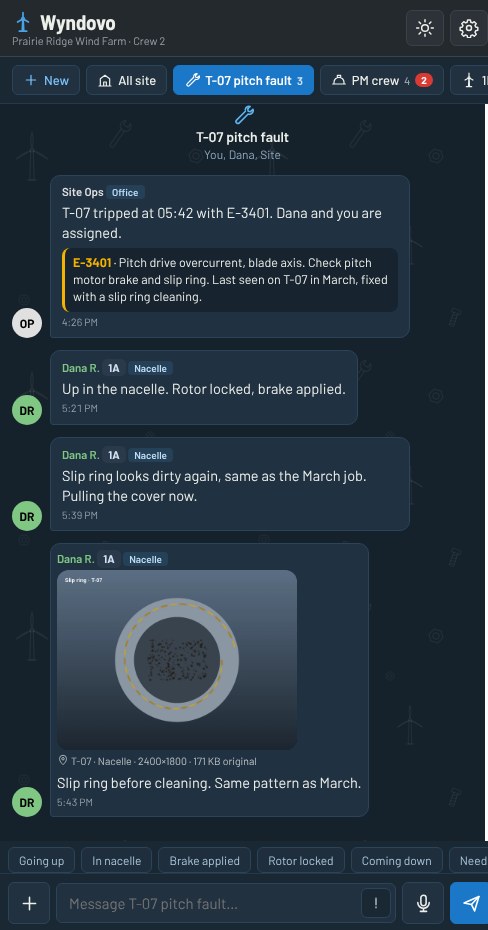
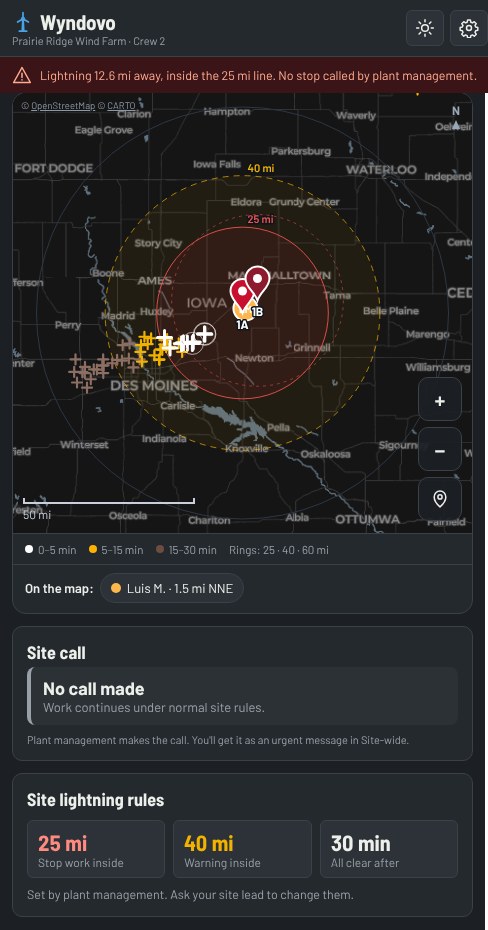
One app instead of six
Everything a site crew juggles today, in one place. Techs sign in with their phone number, and plant management runs the site from the same app.
What's inside
Everything a site crew already does over radio, text and whiteboards, in one place. Messages wait and send on their own when signal comes back.
Troubleshooting at the turbine
Type a fault code or a question and get the answer from your OEM manuals, SOPs and past crew fixes, with the page it came from. Pull up the exact schematic, zoom in, and send that page to a crewmate's chat in two taps.
Crew and job chats
All-site and job chats with photos, video and live location. Push alerts reach phones even when the app is closed, and fault codes like E-3401 explain themselves in the message.
Lightning and site calls
Live satellite lightning on a street map of your area, measured from your site with your stop-work and warning distances. Plant management makes the All stop, Caution or All clear call, and every phone gets it at once.
Wind and weather
Today's wind, gusts at ground and hub height, and the forecast for the morning meeting, checked against the climb and crane limits you set for each turbine model.
Checklists that fit the job
Build one in seconds: known issues for one tower, a daily safety observation for each tech, or a fleet-wide check like accumulator bolts on every turbine. See who's done, tower by tower or person by person, with photos and notes on each item.
Plan of the day
Plant management uploads the POD and assigns jobs. Techs acknowledge it and update status from the field.
Travel crews and shared buildings
Service crews get private job chats per site, with a code plant management can use to join. Two sites in one building, like 1A and 1B, share one account.
Built for companies
Phone-number sign-in, admin controls, one-tap offboarding, number privacy and an audit log. See Security.
Pricing
Try it free for 30 days. Then pay only for the seats you fill, and move a seat to the next hire when a tech leaves.
Pro
- $25 per lead seat/month for plant managers and leads
- $129 minimum per site
- Unlimited people and sites
- Plan of the day, admin tools, audit log
- Unlimited history
Enterprise
- Priced per site for large fleets
- Single sign-on
- 7-year safety records
- Dedicated support
| Seat or option | Yearly | Monthly |
|---|---|---|
| Crew seat (techs: chat, photos, lightning alerts, assignments) | $10/month | $12/month |
| Lead seat (plant managers and leads: plan of the day, admin, lightning rules, billing) | $25/month | $30/month |
| Minimum per site | $129/month | $129/month |
| Travel crew plan (service crews that move site to site; no site minimum, unlimited jobs) | $10/tech, $25/lead | $12/tech, $30/lead |
| Contractors and visitors (guest access for 30 days) | Free | Free |
| Live lightning data (add-on, per site) | +$100/month | +$100/month |
Example: a wind site with 2 leads and 15 techs pays $200 a month billed yearly, covering the whole site. A small crew of 1 lead and 5 techs pays the $129 site minimum.
Founding sites: the first 10 sites get 20% off for 2 years. Ask about it when you start your pilot.
Travel crews: service companies that move site to site get their own Wyndovo crew. The crew lead makes a private job chat for each site, lightning follows the job, and plant management can join a job chat with a code.
Turnover doesn't cost you. When a tech leaves, remove them and give their seat to the next hire. You're billed for seats, not for every person who has ever been on the crew.
Every account starts with a free 30-day pilot with everything in Pro. No payment details are needed until it ends. Start a pilot.
Prices in US dollars, before applicable taxes.
Start a 30-day pilot
Tell us about your site and we'll set it up with you. Free for 30 days, no card needed.
Trust and security
Last updated November 25, 2026
Wind and solar companies trust us with their crews' messages, locations and safety records. This page explains how we protect them. Questions: security@wyndovo.com.
Accounts and access
- Phone-number sign-in with a one-time text code. No passwords to reuse or forget.
- Two-step sign-in for admins and plant managers, which companies can require.
- Company single sign-on (for example Okta or Microsoft Entra ID) on enterprise plans. Planned.
- Roles: tech, chat admin and plant management. Permissions are checked on our servers, not only in the app.
- Offboarding: an admin can remove a person from a site, sign them out of every device and erase the app's data on their phone in one step.
- Audit log of admin actions such as removals, rule changes, plan publishing and data exports.
Data protection
- Data is encrypted in transit (TLS 1.2 or higher) and at rest (AES-256).
- Customer data is stored with Supabase, our database and file host. Backups run [daily] and are kept for [30] days.
- Each company's data is kept separate from other companies' data.
- Photos and videos are stored at original quality and are only visible to members of the chat they were shared in.
- Messages are not end-to-end encrypted, so your company can keep records for safety audits and legal holds. Our staff access customer data only to provide support you ask for, or when the law requires it, and that access is logged.
Location
The app only shares a person's location when they choose to share it, for a limited time they pick (15 minutes to 8 hours), and they can stop at any time. We do not track location in the background. Lightning alerts use the site's location, not a person's.
Testing and audits
- Independent penetration test: Planned before general release.
- SOC 2 Type II: Not started yet.
- We complete customer security questionnaires. Ask security@wyndovo.com.
Report a security issue
If you find a vulnerability, email security@wyndovo.com with steps to reproduce it. Please give us a reasonable time to fix it before sharing details publicly. We won't take legal action against good-faith research that avoids privacy violations, data destruction and service disruption.
See also: Subprocessors · Data Processing Agreement · Privacy Policy
Privacy Policy
Effective November 25, 2026
1. Who controls your information
When your company uses the app, your company decides how work communications are used and kept. For that information we act as a service provider (or "processor") and follow your company's instructions under our agreement with them. For information about the people who visit this website or contact us, we decide how it is used.
2. What we collect
- Account details: phone number, name, the "about" line you write, your role and the sites you belong to.
- Content you share: messages, voice notes, photos, videos, files, reactions, pinned messages, and plan-of-the-day assignments and status updates.
- Location you choose to share: when you start live location sharing, your device's location for the time you pick. Photos may include the location and time you were at when you took them.
- Site information: site name, coordinates, turbine or asset names and lightning rules entered by your company.
- Manuals and documents your company uploads.
- Device and usage information: device type, operating system, app version, IP address, crash reports and basic usage events, used to run and improve the service.
- Billing contacts for the company account. Card payments are handled by our payment provider; we do not store full card numbers.
We do not sell personal information, and we do not share it for cross-context behavioral advertising. We do not use your messages to train artificial intelligence models [confirm before launch].
3. How we use it
- To provide the app: deliver messages and alerts, show the plan of the day, run lightning alerts for your site and search manuals.
- To keep accounts secure: verify phone numbers, prevent abuse and investigate security issues.
- To support your company and you, and to bill your company.
- To keep the service working and improve it, using aggregated or de-identified data where possible.
- To meet legal obligations.
4. Who we share it with
- Your company and its admins, who can see work content on their sites, manage members and keep records.
- Other members of your chats, who see what you post there. Your phone number is visible to people on your site unless you choose "Admins only" in your profile.
- Service providers that host data, send text messages and push alerts, provide maps and weather, and process payments. They may only use the data to provide their service to us. See the subprocessor list.
- Legal reasons: when required by law, or to protect someone's safety.
- Business transfers: if we are involved in a merger or sale, under this policy's protections.
5. How long we keep it
Work content is kept for as long as your company's plan says, then deleted. The standard plan keeps content for 2 years; Enterprise keeps safety records for 7 years. Live location points are deleted 24 hours after sharing ends. When an account is deleted, personal account details are removed within 30 days, except what your company or the law requires us to keep.
6. Your rights and choices
- You can edit your name and "about" line, choose who sees your phone number, stop location sharing at any time and leave chats.
- You can delete your account in the app (Settings) or on our account deletion page.
- Depending on where you live, including California and other US states, you may have the right to know, access, correct or delete personal information, and to not be treated differently for using those rights. For work content, we may refer your request to your company, since they control it.
- To make a request, email privacy@wyndovo.com. We will verify your identity using your phone number.
7. Security
We use encryption, access controls and monitoring to protect information. No system is perfectly secure; if a breach affects you, we will notify you and your company as the law requires. More on our Security page.
8. Children
The app is for workers aged 18 and over. We do not knowingly collect information from children.
9. Changes and contact
If we make important changes, we will tell you in the app or by email before they take effect. Contact: Wyndovo LLC, Raymondville, Texas, privacy@wyndovo.com.
Terms of Service
Effective November 25, 2026
1. The service
Wyndovo provides crew messaging, lightning alerts, plan-of-the-day tools and manual search for wind and solar sites. We may improve or change features; we will not remove a core feature during a paid term without notice.
2. Accounts
- Users sign in with a phone number they control and must be 18 or older.
- Customer is responsible for who it invites, for its admins' actions, and for removing people who should no longer have access.
- Keep your device secure and tell us right away about unauthorized use.
3. Safety disclaimer
4. Acceptable use
Don't use the service to break the law, harass people, share content you have no right to share, send spam, try to get around security or access other customers' data, or interfere with the service.
5. Customer data
Customer owns the content its users put into the service. We use it only to provide and support the service, as described in our Privacy Policy and Data Processing Agreement. Customer can export its data during the term and for 30 days after it ends; then we delete it, except backups that expire on their normal schedule.
6. Fees and pilot
- Fees are per paid seat (and per site for Enterprise and add-ons), as listed on our pricing page or order form, billed monthly or yearly in advance. Customer may reassign a seat to another user at no charge.
- New accounts start with a free 30-day pilot. Paid service starts only if Customer adds a payment method or signs an order form.
- Fees are non-refundable except where these terms or the law say otherwise. We may change prices with 30 days' notice, effective at the next renewal.
- Late amounts may lead to suspension after notice.
7. Term and ending
Subscriptions renew automatically for the same period unless cancelled before renewal. Either side may end the agreement if the other materially breaches it and doesn't fix it within 30 days of notice.
8. Warranties and disclaimers
We will provide the service with reasonable skill and care. Otherwise, to the extent the law allows, the service is provided "as is" without other warranties, including fitness for a particular purpose. We do not guarantee the service will be uninterrupted, that messages or alerts will always be delivered, or that third-party data such as lightning detection will be accurate or complete.
9. Limitation of liability
To the extent the law allows, neither side is liable for indirect, incidental, special or consequential damages, or lost profits. Each side's total liability is limited to the fees Customer paid in the 12 months before the claim. These limits do not apply to fraud, willful misconduct, or amounts that cannot be limited by law. [Have counsel set caps and carve-outs, especially for safety features.]
10. Indemnity
Customer will defend us against claims arising from its content or its users' misuse of the service. We will defend Customer against claims that the service, as we provide it, infringes someone's intellectual property.
11. General
These terms are governed by the laws of Texas, and disputes go to the courts in Willacy County, Texas. If any part is unenforceable, the rest still applies. Notices: legal@wyndovo.com.
Safety notice
Effective November 25, 2026
Lightning alerts
- Alerts are measured from the site location your company enters. If it is wrong or missing, alerts will be wrong.
- Stop-work and warning distances and all-clear times are set by your company, not by us. They should match your written safety policy.
- Strike data comes from NOAA weather satellites and outside providers. It can be delayed, incomplete or miss strikes, and satellite strike locations are approximate (within about 5 miles). Network coverage at remote sites can delay or block alerts.
- Thunder or a visible flash means lightning is close enough to be dangerous. Act on it immediately, even if the app shows all clear.
Messages, urgent messages and location
- Messages can be delayed when signal is weak or missing. They are held on the phone and sent when signal returns.
- Don't rely on the app as your only way to call for help. Follow your site's emergency plan and call 911 (or your local emergency number) for emergencies.
- Shared locations are approximate and may lag behind where a person really is.
Using the app at height
Only use the app when it is safe to do so. Secure your phone while climbing and follow your company's rules on phone use at height and near energized equipment.
Data Processing Agreement
Summary. The full agreement is available on request and is signed with each customer that needs one.
- Roles: Customer is the controller ("business") of its work data; we are the processor ("service provider").
- Instructions: we process personal data only to provide the service and as Customer instructs.
- Confidentiality: our staff with access are bound by confidentiality.
- Security: we keep the measures described on our Security page.
- Subprocessors: listed on the subprocessor page. We give 30 days' notice of new ones so Customer can object.
- Breach notice: we notify Customer without undue delay, and within 72 hours of confirming a breach affecting its data.
- Help with requests: we help Customer respond to people's privacy requests and audits.
- Deletion: at the end of service, we delete or return Customer data as described in the Terms.
- US state laws: includes the service-provider terms required by the California Consumer Privacy Act and similar state laws.
Request the full DPA: legal@wyndovo.com.
Subprocessors
Last updated November 25, 2026
These companies help us run the service and may process customer data. We give customers 30 days' notice before adding a new one.
| Company | What they do | Location |
|---|---|---|
| Supabase | Database, sign-in and file storage | [confirm project region] |
| Netlify | Hosts the website and web app | United States |
| Twilio | Sends sign-in codes by text message | United States |
| Browser push services (Google, Apple, Mozilla) | Deliver push notifications to phones | United States |
| CARTO | Street map tiles on the lightning map (map area only) | United States |
| Open-Meteo | Wind and weather forecasts (site location only) | European Union |
| Cloudflare | Domain and email forwarding | United States |
| Stripe | Billing and card processing for company accounts | United States |
Delete your account
For Wyndovo users.
Fastest: in the app
- Open the app and tap Settings (gear icon).
- Tap Delete my account and confirm.
Or send a request
Can't open the app? Send this form and we'll confirm by text message to the phone number on the account.
What gets deleted
- Your name, phone number, profile and sign-ins: deleted within 30 days.
- Messages and photos you posted in work chats belong to your company's records. They are shown as from "Former member" and kept or deleted under your company's retention settings.
- Backups expire within [30 days].
Accessibility
We want the app and this website to work for everyone, including people who use screen readers, larger text or keyboard navigation. We aim to meet the Web Content Accessibility Guidelines (WCAG) 2.1 at level AA.
High-contrast safety colors, large tap targets and text labels on every icon are part of that work. If something doesn't work for you, email support@wyndovo.com and we'll help and fix it.
Service status
[Before launch, connect a status service such as Better Stack or Instatus and replace this page with a link to it, so updates appear even if the main site is down.]
Support
Contact
| Help with the app | support@wyndovo.com |
| Sales and pilots | sales@wyndovo.com |
| Privacy requests | privacy@wyndovo.com |
| Security reports | security@wyndovo.com |
| Wyndovo LLC, Raymondville, Texas |
Common questions
A tech left the company. How do I remove them?
Plant management or a chat admin opens People in All site, taps the person, and chooses Remove from site. They're signed out of every device and the app's data on their phone is erased.
How do I change our lightning distances?
Plant management opens the Lightning tab and taps Edit on Site lightning rules. Everyone on site is notified.
I got a new phone number.
Ask your site lead to invite the new number, then delete the old account in Settings.